DECISION INTELLIGENCE
A fresh perspective for your next question.
Strategy plugins bring thinking methods and practical guidelines to your AI conversations. Choose an approach that fits your question, then turn ideas into steps you can try.
Knowledge and strategy, working together
Knowledge bases
Add background, concepts, and reference material relevant to your topic.
Strategy plugins
Guide the analytical perspective and steps: clarify a problem, compare options, and identify possible actions.
Choose a lens that fits
Decision Intelligence brings together classical wisdom, modern thinking methods, and practical strategies for work, learning, and everyday life.
Sun Tzu Strategy Pro
Examine position, timing, information, and resources to identify favorable actions and avoid unnecessary confrontation.
First Principles
Separate evidence from assumptions, break down a problem, and test a new solution. Useful for engineering and product development.
Underlying Logic
Clarify facts, incentives, and system feedback in business and everyday life. Turn a complex question into something you can test.
Cognitive Bias & Stoic Decision
Recognize thinking traps, distinguish what you can control, and clarify your next action under pressure.
Focus Strategy & Learning Guidance
Prioritize, reduce distractions, identify learning bottlenecks, and plan practice and reflection.
Company of One Pro & Product Strategy
Explore niche positioning, feature trade-offs, automation, and testable business ideas.
Other topics include SWOT Analysis, Management Effectiveness, Negotiation Decision, and Parenting. Read each item’s purpose, description, and references before choosing. Items marked Members Only require membership.
From selection to your next action
1. Open Decision Intelligence
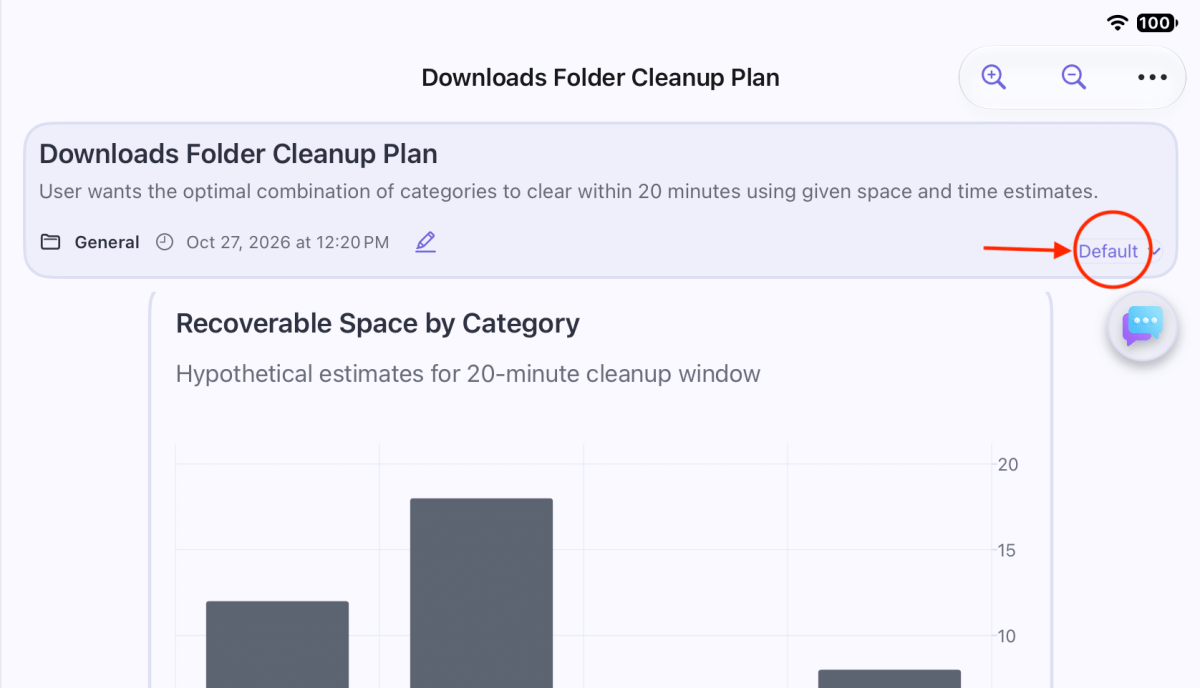
Open the journal containing your question. Tap Default at the bottom-right corner of the question header card, marked with a red circle.
2. Find an approach that fits
Use All Categories at the top right to browse. Read each item’s purpose, description, and References. The Decision & Thinking category includes Sun Tzu Strategy Pro and First Principles. Items marked Members Only are limited to members.

3. Select Focus Strategy
The downloads-folder example begins with a 20-minute cleanup question. Its hypothetical estimates suggest reviewing old installers (12 GB, 5 minutes) and duplicate videos (18 GB, 15 minutes): 30 GB in 20 minutes. Always verify that files are no longer needed before deleting them. To explore attention, time planning, and follow-through, select Focus Strategy.

4. Use a tip—or make it your own
After selection, plugin tips appear in the AI prompt toolbar. Try “Which goal deserves my focus now?”, “How can I reduce distractions?”, or “Help me plan time for deep work.” Tap a tip to place it in the input field. Add your context if needed, then tap the paper-plane button to send.

5. Let the strategy support the analysis
After you send the question, ShāngZhì loads the selected plugin’s strategy knowledge base, providing relevant knowledge, analytical methods, and step-by-step guidance. The panel shows Focus Strategy; the central window displays The model is analyzing. Please wait…

6. Read the response and choose your next action
The example response, Deep Work Time Planning, applies four aspects: Choose, Focus, Sustain, and Review. It includes a key judgment, recommended actions, and a tracking checklist. Review the advice against your actual goal and constraints before deciding what to try.

A closer look: Focus Strategy
The example response turns the method into four practical questions:
- Choose: Does this work deserve your best attention? Consider reusable output and lasting value.
- Focus: How can you go deep? Protect a block of time and remove distractions.
- Sustain: How can you keep going? Use a fixed start cue and a manageable minimum session.
- Review: What should you track weekly? Note the output, interruptions, and whether the start cue worked.
Only have 20 minutes?
The general deep-work tip produced a response recommending a daily 90–120-minute block and a minimum 20-minute session on low-energy days. Restate your task’s time limit to make the follow-up more useful:
I only have 20 minutes to clean up my downloads folder. Please adapt Focus Strategy into a plan I can complete within 20 minutes, including preparation, cleanup steps, and a stopping point. Remind me to verify that files are no longer needed before deleting them.
The plugin provides the analytical method; you provide the actual goal and constraints. Add any conditions the response has not yet addressed to bring the discussion closer to what you need.
Original Model Conversation
Read the original cleanup question and the Focus Strategy follow-up, including the model’s responses. The cleanup figures are hypothetical estimates.
View the complete conversation and original chart code
User
10/27/2026, 12:18 PM
My downloads folder keeps growing. What should I clean up first if I only have 20 minutes?
Use these hypothetical estimates: old installers—12 GB recoverable in 5 minutes; duplicate videos—18 GB in 15 minutes; exported PDFs—2 GB in 10 minutes; temporary archives—8 GB in 5 minutes. Assume the categories do not overlap and each category must be reviewed as a whole. Create a bar chart showing recoverable space by category. Recommend the combination that frees the most space within 20 minutes, and state its total estimated space and time. Include checking that files are no longer needed before deleting them.
Keep the English response around 150–250 words excluding chart code. Use a short title, one-sentence takeaway, short category labels, explicit GB units, and two practical next actions. Follow the app’s supported formats, use a restrained palette, and avoid duplicating the full dataset in a table.
Assistant — Nemotron 3 Ultra (free)
10/27/2026, 12:20 PM
Downloads Cleanup: 20-Minute Plan
Takeaway: Target old installers and duplicate videos first to recover 30 GB in exactly 20 minutes.
Hypothetical estimates for 20-minute cleanup window
---
config:
  themeVariables:
    xyChart:
      plotColorPalette: "#4b5563"
---
xychart-beta
    title "Recoverable Space by Category — Recoverable GB"
    x-axis "Category" ["Installers", "Videos", "PDFs", "Archives"]
    y-axis "GB" 0 --> 18
bar [12, 18, 2, 8]- Installers:5 min
- Videos:15 min
- PDFs:10 min
- Archives:5 min
Recommendation: Clean old installers (12 GB, 5 min) and duplicate videos (18 GB, 15 min) for 30 GB total in 20 minutes. Verify each file is no longer needed before deleting—check installer versions against currently installed apps, and confirm video duplicates aren’t unique edits.
Next actions:
- Sort Downloads by file type, select all
.exe/.msi/.dmgolder than 90 days, review, then delete. - Use a duplicate finder (e.g.,
fdupesor Duplicate Cleaner) on video folders, preview matches, then remove confirmed copies.
User
10/27/2026, 1:23 PM
Help me plan time for deep work.
Assistant — Nemotron 3 Ultra (free)
10/27/2026, 1:23 PM
Deep Work Time Planning
Focus Diagnosis
| Aspect | Assessment |
|---|---|
| Choose – Does this deserve your best attention? | Yes. Deep work creates reusable assets and compounding value. |
| Focus – How to go deep? | Protect a single 90–120 min block daily; remove phone, notifications, and open tabs. |
| Sustain – How to keep it going? | Fixed start cue (e.g., after morning coffee), same location, minimum viable session (20 min) on low-energy days. |
| Review – What to track weekly? | Which block produced tangible output, what interrupted it, and whether the cue held. |
Key Judgment
Your main constraint is likely fragmented attention, not total hours. A single protected block beats three interrupted ones. Treat the block as a non-negotiable appointment.
Recommended Actions
- Pick one high-leverage target for tomorrow’s deep block (e.g., “draft API spec,” “refactor auth module,” “write design doc”).
- Set up the environment tonight: phone in another room, browser profile with only needed tabs, noise-cancelling headphones ready.
- Schedule a 90-minute calendar event labeled “Deep Work – [Target]” at your peak-energy time; add a 10-min buffer before/after for transition.
Tracking Checklist
- ☐ Target defined and written down before the block starts
- ☐ Distractions removed (phone, notifications, extra tabs)
- ☐ Session completed (or minimum 20 min on low-energy days)
- ☐ Brief note: what was produced, what broke focus, cue effectiveness
Note
Superposition provided by Laboratory for Digitalisation
Explore more in the Welcome Project
Open Welcome → What Are Strategy Plugins? inside ShāngZhì for the complete illustrated guide and original model response.